


![JSAUX anti-glare matte screen protector for ROG Ally and ROG Xbox Ally series #style_[2-pack] for all rog ally models](http://jsaux.com/cdn/shop/files/GP0113A-Anti-Glare-Screen-Protector-for-ROG-Ally-_-ROG-Xbox-Ally-Series-1_jpg.png?v=1762310072&width=92)


![Grey 2-pack 90 degree USB-C to USB-C right angle adapters #style_grey [2-pack]](http://jsaux.com/cdn/shop/files/90_-USB-C-to-USB-C-Right-Angle-Adapter-grey-1.png?v=1755238920&width=92)




ゲームセッションにおける最大の課題は、時に最も単純でよくある問題でもあります。前日の夜にゲームセッションの後、コントローラーを充電するのを忘れていませんか?これは、ハードワークの後に少しゲームセッションを楽しめるかどうかの成否を左右する可能性があります。幸いなことに、現代では、最もシンプルな内蔵オプションから洗練されたマルチデバイスステーションまで、さまざまな充電ソリューションが利用可能です。それぞれに長所と短所がありますので、JoyConとProコントローラーを常に満充電に保つための最も一般的で実用的な方法を順に見ていきましょう。さらに、あなたの生活を楽にするおすすめの製品もご紹介します。
まず最初に、最も分かりやすい解決策として、携帯ゲーム機本体に内蔵された充電機能があります。そう、JoyConをSwitch 2に差し込んで充電するだけです。仕事中や日中に他の用事を済ませている間に充電できます。このシンプルな解決策は余計な手間がかからず、本体のUSB-C電源にも対応しているので、その日のゲームを終えたばかりの方には非常に便利です。しかし、JoyConの残量が少なくなってもまだゲームを終えていない場合、この方法は役に立ちません。JoyConを充電している間、本体を放置しておく必要があり、ゲーム時間が削られてしまうからです。
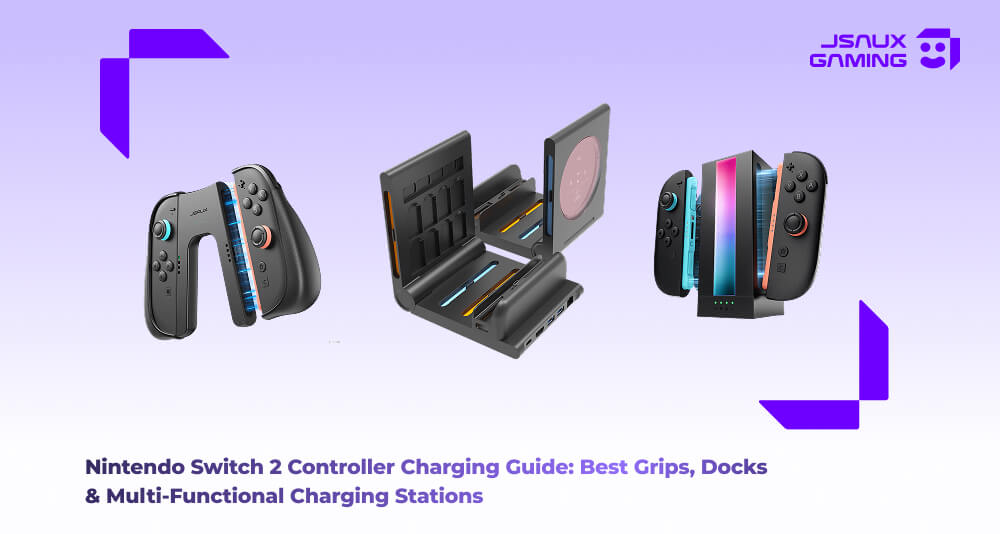
ありがたいことに、そのための解決策があります。JoyConをSwitch 2に接続せずに充電してプレイしたい場合は、グリップ充電が非常に汎用性が高く、堅実な中間点となります。充電グリップを使用すると、JoyConをミニコントローラーのように取り付けることができ、ケーブルを差し込むとJoyConをハンズフリーで充電できるため、充電しながらゲームを続けることができます。その好例が、人間工学に基づいた快適さとLEDインジケーターを備えたSwitch 2用JoyVerseデュアルJoyConグリップ(厚型)です。これにより、JoyConの充電が完了したことを推測することなく正確に確認できます。このすべての選択肢に加えて、安全なグリップデザインと保護シェルを追加したSwitch 2用JoyConオールラウンダーグリップケースとトラベルカバーもあります。これにより、充電、保管が非常に簡単になり、旅行中にコントローラーを非常に保護します。これらの高品質のグリップは、JoyCon を保護してパワーアップさせるだけでなく、手の疲労を感じることなく長時間のゲームセッションでも快適さを提供します。

一方、専用の充電セットアップについて話している場合、特に複数のコントローラーとJoyConを混ぜて使用する場合は、個別のアダプターとドック充電器がより面白くなり始めます。EnergyFlow | Joy-Con充電ドックfor Switch 2などのコンパクトなユニットを使用すると、最大4つの異なるJoyConを同時に充電でき、ステーションには各デバイスが完全に充電されたことを示すLEDステータスライトも備わっています。コンパクトで驚くほど持ち運びにも便利です。JoyConとProコントローラーの両方をお持ちの場合は、そのシナリオにも推奨されるSwitch用Joy-Conエネルギーステーションがあります。これは両方を同じ場所で処理できるため、マルチプレイヤーゲームセッションや家族グループに最適です。

これらのオプションのどちらにも興味がなく、コントローラーの充電だけにとどまらないオールインワンの強力なオプションをお探しの場合は、多機能ドックの出番であり、間違いなく時間をかける価値があります。そのため、M.2 SSDエンクロージャと100W充電器を備えた6-in-1ゲーミングドックは、最大4つの異なるJoyConとProコントローラーを充電できるだけでなく、HDMI出力、高速USBハブ、有線ネットワーク機能、さらにはゲームストレージ(基本的には手のひらで太陽の力)まで、すべてコンパクトなデスクトップソリューションから追加します。すべてを1つの整頓されたコンパクトなパッケージに求めており、ケーブルを交換するなどの手間をかけたくないパワーユーザーに最適です。

結局のところ、Switch 2のセットアップに適した充電ソリューションの選択は、各自の好みやプレイスタイルによって異なります。短時間のゲームセッションでJoyConを一晩充電するだけで十分であれば、内蔵充電器で十分です。しかし、長時間のゲーム中にバッテリーが切れるのが嫌で、手の疲労も軽減したい場合は、グリップや専用ドックが非常に便利で柔軟性に優れています。個人の好みや習慣に基づいて、いつでも組み合わせることができるので、バッテリー残量不足の不安を感じることなく、次のセッションにいつでも備えることができます。特にサードパーティ製のドックを検討し始めるときは、特定のコントローラーとアクセサリの互換性を必ず確認し、スムーズに操作できるように、デバイスのファームウェアをメーカーから最新の状態に保ってください。楽しいゲームを!

コメントを書く
全てのコメントは、掲載前にモデレートされます
このサイトはhCaptchaによって保護されており、hCaptchaプライバシーポリシーおよび利用規約が適用されます。