


![JSAUX anti-glare matte screen protector for ROG Ally and ROG Xbox Ally series #style_[2-pack] for all rog ally models](http://jsaux.com/cdn/shop/files/GP0113A-Anti-Glare-Screen-Protector-for-ROG-Ally-_-ROG-Xbox-Ally-Series-1_jpg.png?v=1762310072&width=92)


![Grey 2-pack 90 degree USB-C to USB-C right angle adapters #style_grey [2-pack]](http://jsaux.com/cdn/shop/files/90_-USB-C-to-USB-C-Right-Angle-Adapter-grey-1.png?v=1755238920&width=92)


![JSAUX anti-glare screen protector 2-pack for Lenovo Legion Go 2 with alignment frame #model_for legion go 2 [2-pack]](http://jsaux.com/cdn/shop/files/GP0132-Anti-Glare-Screen-Protector-for-Legion-Go-2-1.png?v=1766136633&width=92)






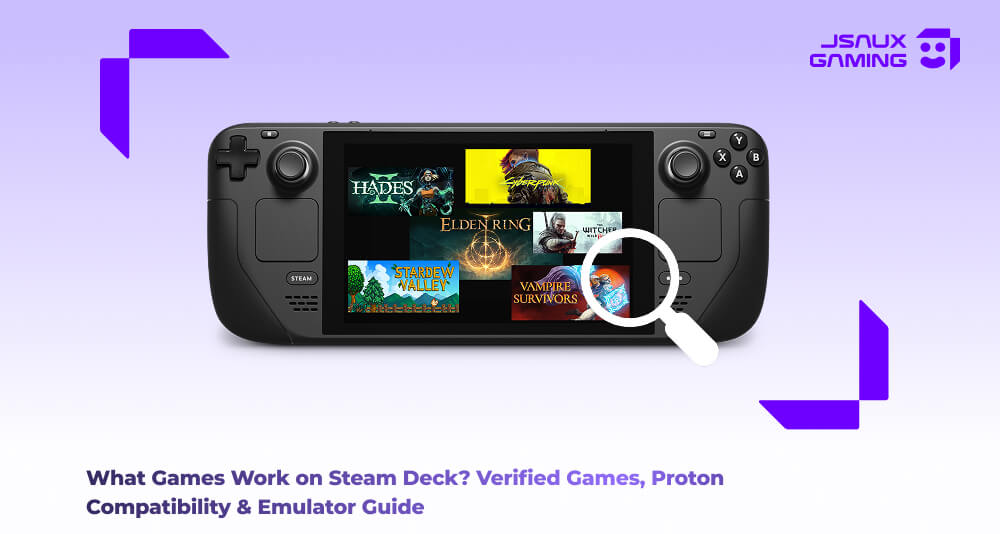
The Steam Deck from Valve has become one of the most versatile handheld gaming devices that is available on the market today. It runs a Linux based operating system and relies heavily on Proton compatibility to run thousands of PC games. Because of this simple fact, the number of games that are available to run on the Steam Deck is a much bigger range than people realise. Within that ecosystem, there are games that are officially verified by Steam themselves and are vetted for smooth performance and such. Meanwhile there are many other games that run surprisingly well with a little bit of tweaking and adjustments. You can even install games from other PC storefronts and run classic games through emulators.
With that said, if you’re here trying to figure out what actually works on the Steam Deck, the short answer is “alot”. The longer, more detailed answer is pretty interesting, so let’s dive into that and break it down section by section.
Steam Official Games that work on the Steam Deck (Verified/playable)
There is a classification system that Steam uses to tell players how well a game works on the console. Games will receive one of four labels-
- Verified
- Playable
- Unsupported
- Unknown
Verified games run incredibly smoothly with the default controls as well as resolutions. You as a player may be required to make some tiny adjustments here and there such as text scaling or manual controller setup, but other than that these games that are classified as “Verified” run incredibly well. Here’s a list of some popular Steam Deck compatible games;
| Game | Steam Deck Status | Genre | Key Features |
| Elden Ring | Verified | Action RPG | Open world exploration, deep combat system |
| Hades | Verified | Roguelike | Fast paced combat, procedural levels |
| Stardew Valley | Verified | Farming Simulation | Relaxing gameplay, crafting and farming |
| The Witcher 3: Wild Hunt | Verified | RPG | Massive story driven open world |
| Vampire Survivors | Verified | Roguelike Shooter | Simple controls, addictive gameplay |
| Cyberpunk 2077 | Playable | RPG | Large futuristic city, story heavy gameplay |
| Red Dead Redemption 2 | Playable | Open World | Realistic open world and narrative |
| No Man's Sky | Verified | Space Exploration | Procedural planets and multiplayer |
Non Officially Verified Games That Work via Proton
Proton is a compatibility layer developed by Valve. It allows Windows games to run on the Linux operating system. Thanks to the development of proton, many titles that aren't technically officially verified, still run very well on the Steam Deck. There are moments when you launch a game expecting problems but it just works instead, and other times you launch the game expecting smooth sailing but instead need to make some tweaks to the proton version or perhaps the community created controller profiles. For the most part, the community has usually reported that these games tend to perform well even if they don't have the official Steam Deck verification label. Here’s a list of a bunch of games that fit into this particular classification:
| Game | Typical Proton Compatibility | Notes |
| Grand Theft Auto V | Works well | May require Rockstar launcher login |
| Persona 5 Royal | Works well | Runs smoothly with controller support |
| Monster Hunter World | Works well | Minor graphical tweaks recommended |
| Final Fantasy XIV | Works with Proton | Popular MMO on Steam Deck |
| Overwatch 2 | Playable through Proton | Requires Battle.net launcher |
Non Steam Platform Games That Can Run on Steam Deck
We talked earlier about how the Steam Deck supports other PC gaming platforms. The Steam Deck does not limit what you can install on the handheld. With a little bit of rejigging, you can install a bunch of platforms via the Steam Deck’s “desktop mode” and then add them as non-steam games. Trust us, it sounds a lot more complicated than it actually is, but when you do it once, repeating it for the other platforms becomes routine.
| Platform | Example Games | Compatibility Method |
| Epic Games | Fortnite, Rocket League | Heroic Launcher or Proton |
| GOG.com | Cyberpunk 2077, Baldur's Gate 3 | Heroic Launcher or manual install |
| Battle.net | Diablo IV, Overwatch 2 | Launcher installed through Proton |
| Electronic Arts EA App | Apex Legends, Star Wars Jedi: Fallen Order | Steam compatibility or Proton |
Emulators and Classic Games on Steam Deck
If we haven't already given you enough good reasons to get a Steam Deck, well here’s yet another one- THe Steam Deck has the ability to emulate classic consoles, allowing people who are big into retro gaming to have a single platform that lets them relive their childhood. Since the Steam Deck is essentially just a miniature PC, it can run a wide variety of emulators. Many users in the community tend to use EmuDeck, which simplifies the process of installing emulators. Retro games also tend to run extremely well since they require considerably less hardware power, which means for some users the Steam Deck just turns into a portable retro console grand library.
| Emulator | Supported Systems | Example Games |
| RetroArch | Multiple retro systems | Super Mario World |
| Dolphin | GameCube and Wii | The Legend of Zelda: The Wind Waker |
| PCSX2 | PlayStation 2 | Shadow of the Colossus |
| Citra | Nintendo 3DS | The Legend of Zelda: Ocarina of Time 3D |
| PPSSPP | PlayStation Portable | God of War: Chains of Olympus |
Having said all of that, before you install a game on your Steam Deck, it helps to confirm how well it runs on the device. There are a bunch of ways to do this. You can use team Steam Deck Compatibility Labels (Verified, Playable, Unsupported, Unknown).
Verified means the game runs perfectly with controller and default settings. Playable means that the game works but may need some small adjustments. Unsupported means that the game has some known issues that can prevent proper gameplay. Finally, Unknown means that it’s not tested by Valve.
The ProtonDB is a community driven website where players across the world report real-world compatibility results. Games on this website will receive ratings (Platinum, Gold, Silver and finally Bronze) depending on how well they run.
Finally, there are the community gaming forums, subreddits and steam discussions which end up often providing updated guides and configuration suggestions for many games. As is tradition, the community tends to find a solution long before the official updates appear, meaning it’s always worth checking out these sources.
Dynamic Steam Deck Libraries and Compatibility Databases
Because so many new games are released on a frequent basis and compatibility updates happen often as well, there aren't any static lists per se. That’s not necessarily a bad thing. The good news is that there are several official and community oriented libraries that track the Steam Deck compatibility in real time. These resources allow you as a player to check the status of a game for the Steam Deck -whether the game is verified, playable or perhaps it works through Proton- before installing it on their device. Here’s a list of the most useful compatibility libraries you can find:
| Resource | Type | What It Shows |
| Steam Deck Verified Program | Official Valve database | Official labels such as Verified, Playable, Unsupported |
| Steambase compatible games list | Real time compatibility tracker | Large database of Steam Deck compatible titles |
| Steambase verified games list | Curated verified titles | Dedicated list of officially verified Steam Deck games |
| ProtonDB | Community testing platform | Real world reports for games running through Proton |
The official verified Steam Deck Database from Valve allows users to browse through thousands of tested games. As mentioned before, This is where games are categorized into 4 main labels (Verified, Playable, Unsupported, Unknown). This is usually the first place that players will check when deciding what to install on their Steam Deck.
Another useful resource is Steambase which tracks large numbers of compatible titles and organizes them into searchable libraries. Steambase is particularly useful, because it aggregates all the data from steam and community sources to show you compatibility trends across thousands of titles.
You can browse these lists here:
For games that are not officially verified, the community comes to the rescue via the ProtonDB platform (which is the most widely used platform incidentally). Players submit detailed reports, which includes information about game performance, tweaks that are required to run the game well, controller fixes and also information about which version of Proton works best for that particular game title. Furthermore, ProtonDB also assigns ratings (Platinum, gold, silver, bronze) that helps users to quickly see how well a game that they’d maybe be interested in runs, even if it doesn't have an official Steam Deck verification label.
Using all of this information and dynamic libraries together gives the players a clear overview of the state of game compatibility for the Steam Deck. The official lists provide verified results, while the community effort shows that many additional titles also work perfectly with some minor adjustments, yet again showing the strength of the Steam Deck.
Tips for Optimizing Steam Deck Game Performance
Despite a game working well, there is always room for improvement. You can always make tweaks that help further improve game performance or battery life as well. Adjusting the graphics settings can dramatically affect and improve your frame rates:
| Setting | Recommended Adjustment |
| Resolution scaling | Use FSR upscaling |
| Shadows | Set to medium or low |
| Anti aliasing | Use lower settings |
| Frame rate limit | Lock to 30 or 40 FPS |
You can also change the version of proton you’re using, since Steam allows for you to actively switch between different versions. Sometimes, either an older or an experimental build of Proton can result in fixing issues that may affect certain games.
The Steam Input also allows you to fully customize your controller layout schemes. Players can create their own layouts and share them with the community at large, which you can download and use if it fits your playstyle. This is especially useful when you play games such as RTS games where they were originally designed for playing with a keyboard and mouse layout.
And finally, the Steam Deck also includes built in controls where players can adjust specific settings such as FPS limits, GPU clock speed, Thermal Performance settings and even Battery Optimization. Adjusting these settings can help balance your Steam Deck’s performance and extend your battery life.
Summary
At the end of the day, the Steam Deck library is absolutely massive. Between official Steam Deck verified games, Proton compatible titles, third party launchers and emulator support, the handheld can run thousands of games across multiple generations, and that is one of the biggest appealing factors for the Steam Deck. One moment you’re running through a modern RPG such as Elden Ring, another moment you’re reminiscing and revisiting a classic platformer from your childhood. This flexibility is what makes the Steam Deck feel less like a console, and more like an absolutely powerful portable gaming ecosystem.
Bear in mind though, game compatibility varies depending on Steam Deck updates, proton versions and specific game patches as well. Always ensure that you check your Steam Deck verification label or ProtonDB before you jump into the game.
To get the most out of your Steam Deck, consider adding some essential accessories. From protective cases and screen protectors to docks and controllers, the right gear can make gaming even more enjoyable. Check out our recommended Steam Deck accessories here: Shop Steam Deck Accessories .


发表评论
所有评论在发布前都会经过审核。
此站点受 hCaptcha 保护,并且 hCaptcha 隐私政策和服务条款适用。