


![JSAUX anti-glare matte screen protector for ROG Ally and ROG Xbox Ally series #style_[2-pack] for all rog ally models](http://jsaux.com/cdn/shop/files/GP0113A-Anti-Glare-Screen-Protector-for-ROG-Ally-_-ROG-Xbox-Ally-Series-1_jpg.png?v=1762310072&width=92)


![Grey 2-pack 90 degree USB-C to USB-C right angle adapters #style_grey [2-pack]](http://jsaux.com/cdn/shop/files/90_-USB-C-to-USB-C-Right-Angle-Adapter-grey-1.png?v=1755238920&width=92)


![JSAUX anti-glare screen protector 2-pack for Lenovo Legion Go 2 with alignment frame #model_for legion go 2 [2-pack]](http://jsaux.com/cdn/shop/files/GP0132-Anti-Glare-Screen-Protector-for-Legion-Go-2-1.png?v=1766136633&width=92)






📌 The Best Steam Deck Accessories (2026 Guide)
The Steam Deck is powerful on its own, but the right accessories can completely change how you use it in everyday life.
Whether you’re gaming on a TV, setting up a desk station, or traveling, a well-chosen setup makes everything more comfortable and flexible.
This guide focuses on practical accessories that actually improve real usage, not just add extra features.
1. Docking Station – For TV and Desktop Gaming
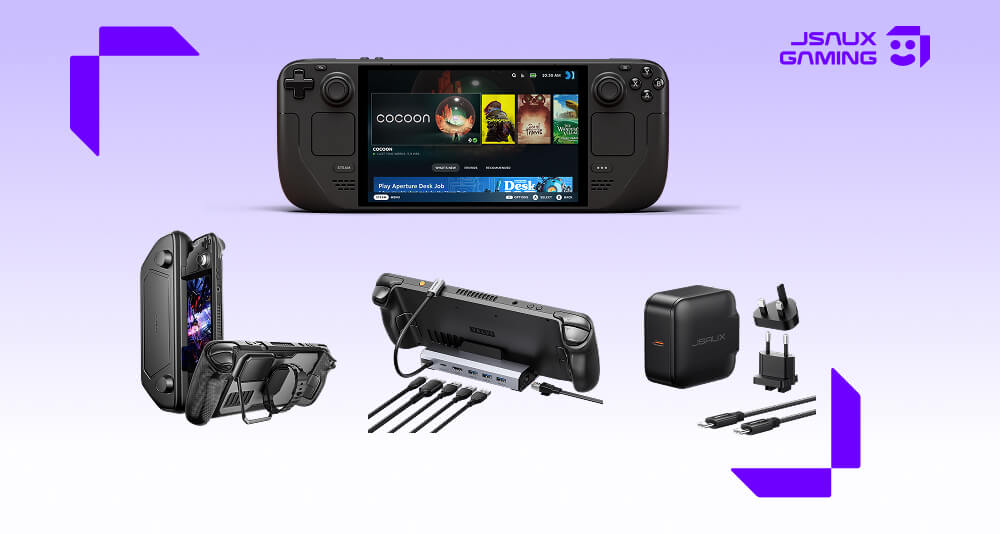
A docking station is usually the first upgrade most Steam Deck users make if they want a bigger-screen experience.
It allows you to:
- Connect your Steam Deck to a TV or monitor
- Use controllers, keyboard, and mouse
- Charge while gaming
- Add Ethernet for more stable online play
Most modern docking setups support:
- Up to 4K@120Hz output (device and display dependent)
- Stable 4K@60Hz for Steam Deck and similar handhelds
- Multiple USB connections for accessories
Explore our docking station collection to find the right model for your setup, or learn more about how to optimize your setup in our Steam Deck docking station guide.
2. Protective Case – Protection and Daily Flexibility
A good case doesn’t just protect your device—it also changes how you use it day to day. In the JSAUX ecosystem, there are two very different approaches:
🟢 ModCase – Functional All-in-One Protection (Recommended)
JSAUX ModCase for Steam Deck PC0104
The ModCase is designed for users who want more than basic protection. It works as a modular system that supports both handheld and desk setups, making it one of the most flexible options available. Key features:
- Full-body protection for daily use
- Built-in stand for desktop gaming
- Modular design for expanded setups
- Works well with docking stations
This is the best choice if you switch between portable and docked gaming.
🟡 Transparent Cover – Lightweight Style Protection
JSAUX Transparent Cover Series for Steam Deck
The Transparent Cover is mainly focused on appearance and light protection. It is suitable for users who want:
- A clean, minimal look
- To show the original Steam Deck design
- Basic scratch protection for casual use
This is more of a style accessory than a functional upgrade.
3. Charger and Power Setup
Once you start using a dock or longer gaming sessions, power stability becomes more important. A reliable setup usually includes:
- A 65W or higher USB-C charger
- A high-quality USB-C cable
This ensures stable performance even when multiple accessories are connected.
👉 You can explore compatible options here: https://jsaux.com/collections/cables-chargers-for-steam-deck
4. Controllers and Input Devices
For TV or desk setups, external controllers can make the experience more comfortable. Common use cases:
- Couch gaming on a TV
- Multiplayer gaming sessions
- Desktop-style setups with keyboard and mouse
Most users simply use standard Bluetooth or console controllers here, depending on preference.
5. Storage Options
Storage is something most users eventually need to expand. The most common solution is: MicroSD cards for easy and reliable expansion.
It works well for both portable and docked setups, and requires no additional configuration.
Choosing the Right Setup for Your Needs
Most Steam Deck users fall into one of three setup styles:
-
🎮 Casual Home Gaming Setup
Docking station, Controller, Basic charging setup -
🖥 Desk / TV Setup
Docking station, External monitor or TV, ModCase for flexibility
Stable USB-C power -
✈️ Travel Setup
ModCase or protective cover, Compact charger, Minimal accessories
Final Thoughts
The Steam Deck becomes significantly more versatile when paired with the right accessories. For most users, the best starting point is:
- A reliable docking station
- A functional protective case like the ModCase
- A stable charging setup
From there, you can expand your setup based on how and where you play—whether at home, at a desk, or on the go.


发表评论
所有评论在发布前都会经过审核。
此站点受 hCaptcha 保护,并且 hCaptcha 隐私政策和服务条款适用。