


![JSAUX anti-glare matte screen protector for ROG Ally and ROG Xbox Ally series #style_[2-pack] for all rog ally models](http://jsaux.com/cdn/shop/files/GP0113A-Anti-Glare-Screen-Protector-for-ROG-Ally-_-ROG-Xbox-Ally-Series-1_jpg.png?v=1762310072&width=92)


![Grey 2-pack 90 degree USB-C to USB-C right angle adapters #style_grey [2-pack]](http://jsaux.com/cdn/shop/files/90_-USB-C-to-USB-C-Right-Angle-Adapter-grey-1.png?v=1755238920&width=92)


![JSAUX anti-glare screen protector 2-pack for Lenovo Legion Go 2 with alignment frame #model_for legion go 2 [2-pack]](http://jsaux.com/cdn/shop/files/GP0132-Anti-Glare-Screen-Protector-for-Legion-Go-2-1.png?v=1766136633&width=92)




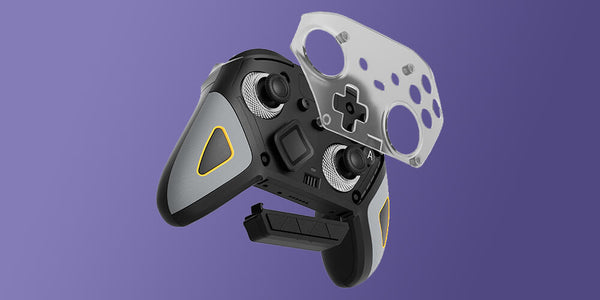



JoyCon and Controller drift and random disconnections during use are some of the most common issues you can run into as a Switch 2 owner, so let’s talk about the problem in more detail and break down some solutions that can help you alleviate that.
Drift is essentially unintended movement caused by your controller even when you’re not touching the sticks, and connection issues can cause lag or sudden connection drop outs. These types of problems are usually a result due to outdated firmware, calibration issues, dust and debris buildup, and just plain old general wear and tear from heavy use. Instead of going the expensive route and just buying new controllers, it may be worth trying out some straightforward fixes and solutions that can easily remedy the situation without spending money at all.
Let’s Talk Troubleshooting
-
Recalibrate your JoyCons- The very first step you should be attempting to deal with stick drift is recalibrating your JoyCons, as this simple step usually deals with a bunch of stick drift issues itself. To do this, you need to open up your “System Settings” on the Switch 2, navigate to “Controllers”, and select the option to recalibrate the affected JoyCon. The process is simple, just follow the on-screen instructions carefully to ensure accurate recalibration of the faulty JoyCon.
-
Update your firmware- While you are in your Switch 2’s settings menu, make sure you check for updates for both the system as well as controller firmware updates. Nintendo is known to frequently include stability and input fixes in their updates, and skipping these essential updates can potentially lead to inconsistent behaviour from your devices. After you update your devices, fully power off your console and restart it instead of putting it into sleep mode. The “Clean Boot” option can help stabilize inputs and restore a solid connection. We recommend completely switching off your console on a semi regular basis as well, since it does help the overall device and battery health as well as performance too.
-
Reset your JoyCon connection- If the recalibration of your JoyCons didn't fix the issue and the drift and disconnection problems still persist, the next logical step to take is trying to reset the JoyCon connection. To do this, simply detach the controllers, switch off the power to your console completely. Then turn it back on after a minute or so, and then re-pair the JoyCons from scratch. This can usually take care of any lingering pairing or wireless connectivity issues.
- Keep your JoyCons clean- With regular and heavy usage, dust and debris will build up over time, potentially getting into the joystick area. Even the tiniest particles can affect your device’s input over time. You can gently clean around the stick with a soft brush or compressed air, and that can help movement feel normal again without the need to open up anything or potentially risking more damage to your device.
Regular care and proper handling can help reduce long-term wear for your Switch 2. There are many third-party accessories and products that you can take advantage of that can help with a variety of things- for example, accessories that help improve grip or ergonomics that help make the controllers more comfortable to use, which can have a direct impact in reducing stress and pressure on your JoyCon sticks, which in turn slows down the progression of stick drift. Power management also matters. Low battery levels can cause unstable connections that can drop, so ensuring that your JoyCons are always sufficiently and consistently charged can help prevent sudden disconnects during gameplay.
Summary
While we understand that Drift and controller disconnections are frustrating, the good news is that they’re easily fixable. With our troubleshooting guide, following it step by step will help you diesel with all the problems and be back to your gaming self in no time, and will also help you save money instead of buying a new JoyCon every time you experience these problems. A little patience, maintenance and care go a long way to ensuring you can get back to smooth movement, stable connections and long immersive gaming sessions.
For more Switch 2 accessories and grips, check out our full Switch 2 collection.


发表评论
所有评论在发布前都会经过审核。
此站点受 hCaptcha 保护,并且 hCaptcha 隐私政策和服务条款适用。