


![Grey 2-pack 90 degree USB-C to USB-C right angle adapters #style_grey [2-pack]](http://jsaux.com/cdn/shop/files/90_-USB-C-to-USB-C-Right-Angle-Adapter-grey-1.png?v=1755238920&width=92)


![JSAUX anti-glare matte screen protector for ROG Ally and ROG Xbox Ally series #style_[2-pack] for all rog ally models](http://jsaux.com/cdn/shop/files/GP0113A-Anti-Glare-Screen-Protector-for-ROG-Ally-_-ROG-Xbox-Ally-Series-1_jpg.png?v=1762310072&width=92)


![JSAUX anti-glare screen protector 2-pack for Lenovo Legion Go 2 with alignment frame #model_for legion go 2 [2-pack]](http://jsaux.com/cdn/shop/files/GP0132-Anti-Glare-Screen-Protector-for-Legion-Go-2-1.png?v=1766136633&width=92)






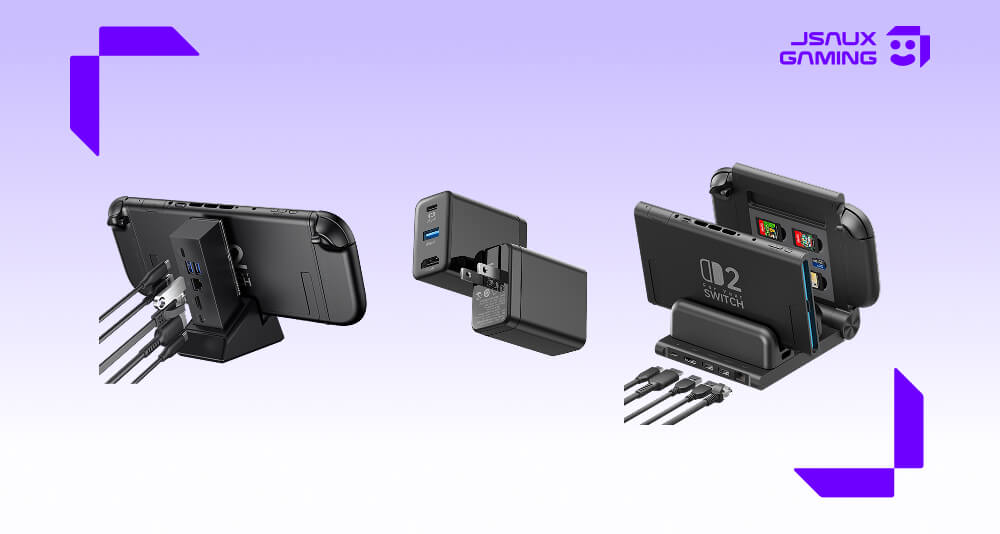
Looking for the best Switch 2 Dock in 2026? The answer depends on how you actually use your console. Some players want a compact dock they can throw into a bag for travel or move easily between rooms. Others want a more complete setup with extra ports, wired internet, or a better way to keep controllers charged and organized.
That is why JSAUX now offers more than one strong option in this category. Instead of forcing every player into the same setup, these docks cover different needs, from portable TV mode to full desk or living room stations. If you are still building your overall setup, you can also browse the full Nintendo Switch 2 Accessories Collection for compatible add-ons.
For most users, the OmniCentro is the easiest recommendation because it keeps things simple and portable. If you need more connectivity, the 7-in-1 model makes more sense. And if you want a dock that also acts as a charging hub for controllers, the 6-in-1 Gaming Dock stands out.
Quick Picks
- Best overall Switch 2 Dock: OmniCentro Charger Dock for Switch 2
- Best for desk setups and extra ports: 7-in-1 Multifunctional Docking Station for Switch 2
- Best for controller charging: 6-in-1 Gaming Dock for Switch 2
Switch 2 Dock Comparison
| Product | Best For | Key Features | Video Output | Charging |
|---|---|---|---|---|
| OmniCentro Charger Dock for Switch 2 | Travel, simple TV mode setups, everyday use | 3-in-1 design, HDMI, USB-A, compact form factor | Up to 4K@60Hz on Switch 2 | Up to 65W PD |
| 7-in-1 Multifunctional Docking Station for Switch 2 | Home setups, more ports, wired gaming | HDMI 2.1, Gigabit Ethernet, USB-C, dual USB-A, modular base | Up to 4K@60Hz on Switch 2 | Up to 100W PD input |
| 6-in-1 Gaming Dock for Switch 2 | Shared gaming spaces, controller charging, organized setups | 4 Joy-Con charging, Pro Controller charging, adapter dock support, HDMI, Ethernet, storage support | Up to 4K@120Hz; actual Switch 2 output depends on system limits | Up to 100W PD input, 60W console charging |
What Makes a Good Switch 2 Dock?
A good Switch 2 Dock should do more than just connect your console to a screen. It should make docked play easier, cleaner, and more reliable for the way you actually play.
For one player, that might mean something compact and easy to pack. For another, it means more ports and Ethernet for a permanent home setup. And for households that use multiple controllers, charging support can matter just as much as video output.
That is also why there is no single “best” dock for every type of user. The right choice usually comes down to one of three priorities:
- Portability
- Connectivity
- Charging and organization
The three JSAUX docks below each handle those priorities a little differently.
1️⃣ OmniCentro Charger Dock for Switch 2
 The OmniCentro is the most balanced option in the lineup and the one that will make sense for the largest number of people. It combines the essentials into a smaller, cleaner design: HDMI output for TV mode, USB-A connectivity for accessories, and up to 65W PD charging.
Its biggest strength is convenience. If you want a Switch 2 Dock that does not feel bulky on a desk and does not become annoying to carry around, this is the one. It is especially useful for players who move between rooms, travel often, or simply prefer a minimalist setup instead of a larger docking station.
It also feels closer to how many people really use their console day to day. Not everyone needs a full port-heavy dock. A lot of players just want something dependable that lets them switch to TV mode quickly and keep the system charged while playing.
Why it stands out:
- Compact and easy to carry
- Simple setup for TV mode
- Useful for both home and travel
- Covers the essentials without extra bulk
If you want the most practical all-around option, the OmniCentro Charger Dock for Switch 2 is the safest pick.
2️⃣7-in-1 Multifunctional Docking Station for Switch 2
 The 7-in-1 model is the better choice for users who want a more complete home setup. It offers more flexibility than a compact dock, with HDMI 2.1, Gigabit Ethernet, USB-C input, and multiple USB ports for accessories or peripherals.
This is the dock for players who regularly use their Switch 2 in one place and want a setup that feels more permanent. If your console often sits on a desk, near a monitor, or in a living room station where multiple accessories stay connected, the extra ports make a real difference.
Another advantage is the modular design. It gives the dock a little more flexibility than a fixed one-piece setup, which can be useful if you want something that still feels adaptable instead of locked to one position.
It is a strong fit if you want:
- More ports for a fuller setup
- Wired Ethernet for stable online play
- A dock that feels better suited to daily home use
- More flexibility than a basic travel dock
For players who care more about connectivity than portability, the 7-in-1 Multifunctional Docking Station for Switch 2 is the better option.
3️⃣6-in-1 Gaming Dock for Switch 2
 The 6-in-1 Gaming Dock takes a more specialized approach. Instead of mainly focusing on portability or general expansion, it is designed to work as a compact gaming hub.
Its standout feature is charging support. It can charge up to 4 Joy-Con 2 controllers and 1 Switch 2 Pro Controller at the same time. When the adapter dock is attached, the Pro Controller charging slot can also power up the Switch 2 console, which adds more flexibility than a standard controller dock.
It also includes HDMI output, Ethernet, USB connectivity, and a design that helps keep accessories in one place. For some users, that organization is just as valuable as the charging itself. A dock like this makes the whole setup feel more intentional, especially if your gaming area is a permanent part of your room or entertainment center.
This is the right dock if your priorities are:
- Charging multiple controllers in one place
- Powering up the Switch 2 console as part of your setup
- Keeping your gaming area more organized
- Building a dedicated home setup
- Reducing cable and accessory clutter
If that sounds like your setup, the 6-in-1 Gaming Dock for Switch 2 is the most purpose-built choice here.
Best Choice by Play Style
The right Switch 2 Dock comes down to how and where you play.
If portability matters most, OmniCentro is the best choice. It is lighter, simpler, and easier to carry than a larger dock, which makes it ideal for travel or flexible use around the house.
If you mostly play in one place and want a stronger home setup, the 7-in-1 dock is the better fit. The extra ports and Ethernet make it more useful as an everyday docking station.
If your setup includes multiple controllers and you want everything charged in one place, the 6-in-1 Gaming Dock makes the most sense. It is the most specialized of the three, but that specialization is exactly what gives it value.
If you also play with a protective shell on your console, it is worth checking this guide to the best Switch 2 cases in 2026, since docking convenience can sometimes depend on the case you use.
Final Thoughts
The best Switch 2 Dock is not always the one with the most features. It is the one that fits your setup with the least friction.
For most people, that will be the OmniCentro because it balances portability, charging, and TV mode in a very practical way. The 7-in-1 model is better for users who want a fuller desktop or living room setup. The 6-in-1 Gaming Dock is the best option for players who want controller charging built into the center of their station.
JSAUX now has enough range in this category that choosing the right dock is less about finding a generic alternative and more about choosing the right style of setup for your own play habits.
FAQ
Q. What is the best Switch 2 Dock in 2026?
A. For most users, the OmniCentro is the best overall choice because it offers the best balance of portability, charging, and TV mode support.
Q. Which Switch 2 Dock is best for travel?
A. OmniCentro is the best option for travel because it is more compact and easier to carry than a larger docking station.
Q. Which Switch 2 Dock has the most ports?
A. The 7-in-1 Multifunctional Docking Station offers the most connectivity in this comparison, including HDMI, Ethernet, USB-C, and dual USB-A ports.
Q. Which Switch 2 Dock is best for charging controllers?
A. The 6-in-1 Gaming Dock is the best option for controller charging because it can charge up to 4 Joy-Con 2 controllers and 1 Switch 2 Pro Controller at the same time.
Q. Does a Switch 2 Dock support 4K output?
A. Yes, JSAUX docks support 4K output, but actual output on Switch 2 depends on official system support and TV mode limitations.
Q. Can a case affect Switch 2 dock compatibility?
A. Yes. Some protective cases can affect fit or docking convenience, so it is a good idea to check compatibility before choosing your final setup.


Leave a comment
All comments are moderated before being published.
This site is protected by hCaptcha and the hCaptcha Privacy Policy and Terms of Service apply.