


![Grey 2-pack 90 degree USB-C to USB-C right angle adapters #style_grey [2-pack]](http://jsaux.com/cdn/shop/files/90_-USB-C-to-USB-C-Right-Angle-Adapter-grey-1.png?v=1755238920&width=92)


![JSAUX anti-glare matte screen protector for ROG Ally and ROG Xbox Ally series #style_[2-pack] for all rog ally models](http://jsaux.com/cdn/shop/files/GP0113A-Anti-Glare-Screen-Protector-for-ROG-Ally-_-ROG-Xbox-Ally-Series-1_jpg.png?v=1762310072&width=92)


![JSAUX anti-glare screen protector 2-pack for Lenovo Legion Go 2 with alignment frame #model_for legion go 2 [2-pack]](http://jsaux.com/cdn/shop/files/GP0132-Anti-Glare-Screen-Protector-for-Legion-Go-2-1.png?v=1766136633&width=92)






The Best Steam Deck Charger (2026 Guide)
The Steam Deck is a powerful handheld, but power management becomes much more important once you start using it for longer sessions or with a docking station.
A weak or underpowered charger can lead to slow charging, battery drain during gameplay, or unstable performance when multiple accessories are connected.
This guide breaks down what actually matters when choosing a charger and how to build a reliable setup.
❓Why You Need the Right Charger for Steam Deck
The Steam Deck consumes significantly more power than typical mobile devices, especially when:
- Playing AAA games
- Using a docking station
- Connecting external controllers or displays
In these situations, a low-wattage charger may not keep up.
👉 This is why most users upgrade to a 65W USB-C charger or higher.
⚡ Recommended Charging Setup
A stable Steam Deck charging setup usually includes:
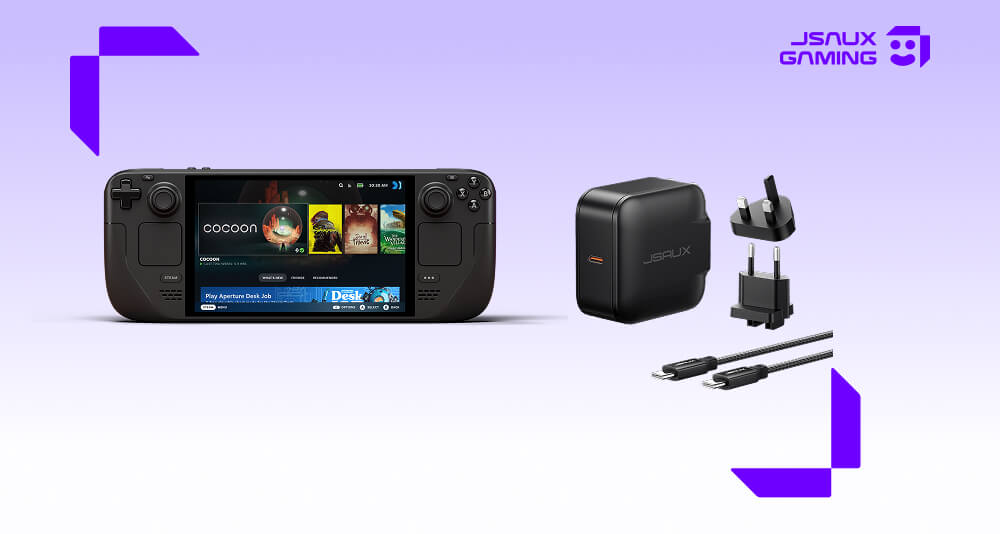
- A 65W or higher USB-C Power Delivery charger
- A high-quality USB-C cable
- Optional multi-port charger for desk setups
This ensures the device stays charged even during intensive gameplay or docked use.
🔌 JSAUX 65W USB-C Fast Charger
For most Steam Deck users, a 65W USB-C charger is the safest and most practical choice. It provides:
- Stable fast charging for Steam Deck and similar handhelds
- Reliable power output during gaming sessions
- Compatibility with docked setups and travel use
Browse more charging options here: https://jsaux.com/collections/chargers
💻 Charging in Docked Setups
When using a docking station, power demand increases because the charger is also supporting:
- HDMI output
- USB accessories (controller, keyboard, etc.)
- Ethernet connection
In this case, a 65W+ charger helps prevent:
- Battery drain while playing
- Performance drops under load
- Unstable accessory behavior
For most dock users, this is the minimum recommended level. If you're planning to use a docking station regularly, you can also explore how to optimize your setup in our Steam Deck docking station guide.
✈️ Travel Charging Setup
For portable use, simplicity matters more than power complexity. A typical travel setup includes:
- Compact USB-C charger
- Single high-quality cable
- Optional power bank for backup
This setup keeps things light while still covering most charging needs on the go.
How to Choose the Right Steam Deck Charger
When selecting a charger, focus on:
- Wattage: 65W minimum recommended, Higher wattage for dock-heavy setups
- USB-C Power Delivery support: Ensures proper negotiation with Steam Deck power requirements.
- Stability under load: Avoid chargers that reduce output during extended gaming sessions.
- Cable quality: A weak cable can limit performance even if the charger is powerful.
❓ FAQ
Q. Can I use any USB-C charger for Steam Deck?
A. You can, but low-wattage chargers will result in slow charging or battery drain during gameplay. A 65W USB-C PD charger is recommended for stable performance.
Q. Is 65W enough for Steam Deck + docking station?
A. Yes. A 65W charger is generally sufficient for most docked setups, including USB accessories and HDMI output.
Q. Will fast charging damage the Steam Deck battery?
A. No. The Steam Deck manages power intake automatically. Using a certified USB-C Power Delivery charger is safe.
Q. What happens if I use a low-wattage charger?
A. The device may charge slowly, or in some cases, discharge while playing if power consumption exceeds input.
🔗 Related Guides
If you're building a full setup, you may also find these helpful:
Steam Deck Accessories Guide >
Steam Deck Docking Station Guide >
Final Thoughts
A proper charger is one of the most important parts of a Steam Deck setup, especially if you use a docking station or play for extended sessions.
For most users, a 65W USB-C fast charger provides the best balance between stability, portability, and compatibility.
From here, you can build a full ecosystem that includes docking, protection, and travel accessories for a complete Steam Deck experience.

Leave a comment
All comments are moderated before being published.
This site is protected by hCaptcha and the hCaptcha Privacy Policy and Terms of Service apply.