


![Grey 2-pack 90 degree USB-C to USB-C right angle adapters #style_grey [2-pack]](http://jsaux.com/cdn/shop/files/90_-USB-C-to-USB-C-Right-Angle-Adapter-grey-1.png?v=1755238920&width=92)


![JSAUX anti-glare matte screen protector for ROG Ally and ROG Xbox Ally series #style_[2-pack] for all rog ally models](http://jsaux.com/cdn/shop/files/GP0113A-Anti-Glare-Screen-Protector-for-ROG-Ally-_-ROG-Xbox-Ally-Series-1_jpg.png?v=1762310072&width=92)


![JSAUX anti-glare screen protector 2-pack for Lenovo Legion Go 2 with alignment frame #model_for legion go 2 [2-pack]](http://jsaux.com/cdn/shop/files/GP0132-Anti-Glare-Screen-Protector-for-Legion-Go-2-1.png?v=1766136633&width=92)






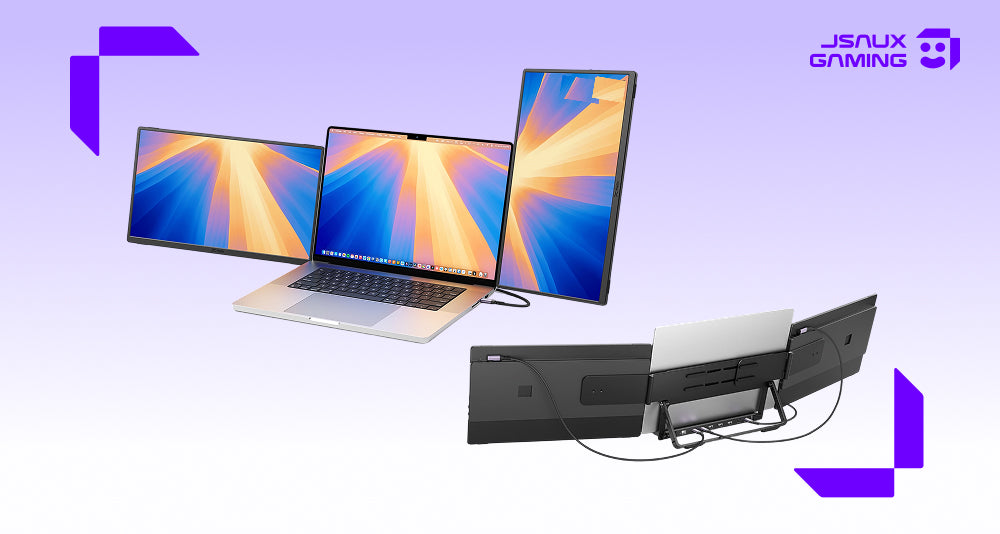
If you are looking for the best portable monitor in 2026, the real question is not just how many extra screens you want. It is how flexible you want your setup to be once you leave your usual desk.
That is where FlipGo Horizon Snap-On Tri-screens feels different from a standard portable monitor. Instead of giving you a fixed second screen, it gives you a modular multi-screen system that can adapt to different workflows, different spaces, and different devices.
For most users, that is the real appeal. A good portable monitor should not only add screen space. It should make multitasking easier, reduce desk clutter, and help you build a setup that still feels practical whether you are working from home, traveling, or switching between productivity and gaming.
Quick Answer
If you want the short version:
- Best overall portable monitor for a flexible mobile workstation: FlipGo Horizon Pro
- Best portable monitor for smoother visuals and gaming: FlipGo Horizon Pro 144Hz
- Best simpler alternative for dual-screen travel setups: FlipGo Portable Dual Monitor
Why FlipGo Horizon Feels Different
FlipGo Horizon stands out because it is built around flexibility, not just extra screen space. Its modular screen system gives users more freedom in how they arrange their workspace, while the Snap Stand Pro adds built-in docking support that makes the setup feel more complete in everyday use.
--- Magnetic Screens, Rotation, and Flexible Layouts
 Most portable monitors add screen space, but many still lock you into one fixed layout. FlipGo Horizon takes a more flexible approach. Its Snap-Lock system makes the screens easier to attach and reposition, the displays can rotate freely between portrait and landscape, and the stand supports different combinations depending on how you work.
That flexibility matters in everyday use. Portrait layouts are especially useful for coding, reading, spreadsheets, and long documents, while horizontal layouts work better for editing, research, communication tools, and timeline-based tasks. Instead of forcing one setup, FlipGo Horizon gives you more control over how your workspace is arranged.
This is what makes FlipGo Horizon feel less like a standard portable monitor and more like a modular portable workspace.
--- Stand and Dock in One
The Snap Stand Pro is not only there to hold the screens. It also works as a built-in dock, which makes the whole setup much more practical than a basic portable monitor plus a pile of adapters. According to the official product page, the stand includes:
- USB-C connections for the displays
- USB-A ports for peripherals
- Gigabit Ethernet
- USB-C upstream to connect to a laptop
- USB-C PD power input up to 100W
 In practical terms, that means fewer separate accessories to carry and fewer cables to manage. Instead of combining a portable monitor, a stand, and a separate hub, FlipGo Horizon brings those functions together in one system. JSAUX also highlights a one-cable workflow for compatible setups, which makes the product feel closer to a portable workstation than to a simple external display.
If you want a portable monitor that can still behave like a serious workstation when you sit down to work, this stand-and-dock design is a real advantage.
How to Choose the Right Portable Monitor
If you are comparing portable monitors, the easiest way to decide is to focus on three questions.
1. Do you want a fixed extra screen or a more flexible multi-screen setup?
If you just want a simpler dual-screen setup for documents, calls, and travel, a standard portable monitor may be enough. If you want more layout flexibility, FlipGo Horizon makes more sense.
2. Do you need docking and desk-style expansion?
If you regularly use accessories, wired internet, or want fewer adapters on your desk, the built-in dock in the Snap Stand Pro becomes much more valuable.
3. Do you care about refresh rate for gaming or motion-heavy tasks?
If smoother visuals matter to you, the 144Hz version is the better fit. If your main focus is work and productivity, the standard model is likely enough.
This is why the best portable monitor is not always the one with the most dramatic spec sheet. It is the one that best matches your workflow.
FlipGo Horizon Pro vs FlipGo Horizon Pro 144Hz
| Item | FlipGo Horizon Pro | FlipGo Horizon Pro 144Hz |
|---|---|---|
| Best for | Work, productivity, writing, coding, multitasking | Gaming, smoother motion, premium mixed use |
| Screen size | 15.6-inch | 16-inch |
| Resolution | 1920 × 1080 | 1920 × 1200 |
| Refresh rate | 60Hz | 144Hz |
| Brightness | 300 nits | 400 nits |
| Aspect ratio | 16:9 | 16:10 |
| Color gamut | 100% sRGB | 100% sRGB |
| Best choice if... | You want the most practical all-around option | You want smoother visuals and a more premium panel |
For most users, FlipGo Horizon Pro is the better all-around choice. It already delivers the core Horizon experience: modular screens, flexible layouts, strong compatibility, and the stand-plus-dock setup that makes the system feel more complete than a typical portable monitor.
If you want your portable monitor to work better for gaming, faster motion, or a more premium viewing experience, FlipGo Horizon Pro 144Hz is the stronger choice.
FlipGo Horizon vs FlipGo Portable Dual Monitor
Not everyone needs a more advanced modular setup. Some users simply want a dual-screen portable monitor that is easier to understand and easier to pack.
| Item | FlipGo Horizon | FlipGo Portable Dual Monitor |
|---|---|---|
| Best for | Flexible workstation setups | Simpler travel and remote work setups |
| Screen style | Modular multi-screen system | Foldable dual-screen monitor |
| Main strength | Magnetic multi-screen flexibility plus stand-and-dock integration | Simpler setup and more traditional dual-screen workflow |
| Better for | Users who want a fuller mobile workstation | Users who want a straightforward portable monitor for everyday travel |
The FlipGo Portable Dual Monitor is still a solid option, especially if your work is centered on email, browser tabs, calls, and general multitasking. Its lineup includes several screen sizes and resolutions, which gives users a simpler path if they do not need the more modular Horizon experience.
If your goal is maximum flexibility, FlipGo Horizon is the more ambitious and more complete system. If your goal is simplicity, the dual-screen FlipGo may be enough. For that use case, this article on the FlipGo Portable Dual-Screen Monitor for digital nomads is a helpful next read.
Who Should Buy FlipGo Horizon?
FlipGo Horizon makes the most sense for users who want their portable monitor to behave more like a real workstation.
It is especially well suited for:
- Remote workers juggling multiple windows throughout the day
- Developers and analysts who benefit from portrait layouts
- Creators who need room for timelines, references, and previews
- Business travelers who want a serious setup away from the office
- Users who want one system that can support both work and gaming
That is really the core of its value. FlipGo Horizon is not just about adding more screens. It is about building a more adaptable workspace wherever you happen to be.

Final Thoughts
If you are looking for the best portable monitor in 2026, FlipGo Horizon deserves serious consideration because it solves more than one problem at once.
Its biggest advantage is not simply that it gives you more display space. It is that the product combines modular screen layouts, magnetic attachment, free rotation, multiple configuration options, and a stand that also works as a dock. Together, those features make it feel much closer to a portable workstation than to a basic external monitor.
For users who know they want something simpler, FlipGo Portable Dual Monitor remains a good alternative. But for users who want more flexibility, more expansion, and more control over their workspace, FlipGo Horizon is the standout option in this lineup.
FAQ
Q. What makes FlipGo Horizon different from a standard portable monitor?
A. FlipGo Horizon is different because it is built as a modular multi-screen system rather than a fixed second display. Its magnetic Snap-Lock setup, freely rotatable screens, and multiple layout options make it more flexible than a standard portable monitor.
Q. Does FlipGo Horizon include docking ports on the stand?
A. Yes. The Snap Stand Pro works as a stand and dock in one. Based on the official product page, it includes USB-C connections, USB-A ports, Gigabit Ethernet, USB-C upstream to a laptop, and USB-C PD power input.
Q. What is the difference between FlipGo Horizon Pro and FlipGo Horizon Pro 144Hz?
A. The main difference is the display experience. FlipGo Horizon Pro uses 15.6-inch 1080p 60Hz panels, while FlipGo Horizon Pro 144Hz uses 16-inch 1920 × 1200 144Hz panels with higher brightness. The standard model is better for work-first users, while the 144Hz model is better for smoother visuals and gaming.
Q. What devices are compatible with FlipGo Horizon?
A. According to the official FAQ, FlipGo Horizon supports Windows laptops, macOS devices, Android phones and tablets with USB-C Alt Mode, and consoles such as Xbox and Switch. It also supports Mini HDMI input for broader compatibility.
Q. Does FlipGo Horizon support portrait mode?
A. Yes. The screens can rotate freely, so FlipGo Horizon supports both portrait and landscape layouts. That makes it especially useful for coding, spreadsheets, long documents, and multi-window workflows.
Q. Does FlipGo Horizon have a built-in battery or touch support?
A. No. Based on the official FAQ, FlipGo Horizon does not include a built-in battery, and touch input is not supported.
Q. Which FlipGo Horizon model is best for my setup?
A. If you mainly want a portable monitor for work, writing, coding, and multitasking, FlipGo Horizon Pro is the best fit for most users. If you want smoother motion and a better gaming experience, FlipGo Horizon Pro 144Hz is the stronger option.

Leave a comment
All comments are moderated before being published.
This site is protected by hCaptcha and the hCaptcha Privacy Policy and Terms of Service apply.